Micro Frontend Architecture
How to break up a frontend monolith, what it buys you, and what it costs.
The Problem
At some scale, frontend codebases start to exhibit the same symptoms as backend monoliths:
- A change to the checkout flow requires coordination with the team that owns the nav bar
- Deployments are all-or-nothing — a bug anywhere blocks everyone
- Different teams want different tech stacks, or different release cadences, but they’re locked together
- Build times grow until they become a daily nuisance
This is the problem Micro Frontend Architecture (MFE) exists to solve.
What Is a Micro Frontend?
The idea is simple: apply the same decomposition philosophy from microservices to the frontend. Instead of one team shipping one big application, multiple teams independently build, test, and deploy their own slices of the UI.
Each micro frontend:
- is owned end-to-end by a single team (backend, frontend, infra, product)
- can be deployed independently without coordination
- is isolated enough that a failure in one doesn’t cascade to the others
The user sees a single coherent app. Under the hood, it’s stitched together from independently-deployed pieces.
Architecture Overview
A typical MFE setup has three layers:
1. Shell Application (Host)
The shell is a thin container that owns the URL router and is responsible for loading and mounting micro frontends. It has minimal business logic. Its job is composition.
2. Micro Frontends (Remotes)
Each MFE exposes a specific surface area of the UI — header, dashboard, cart, profile. They are independently built and deployed, usually to a CDN.
3. Shared Foundation
A design system, auth utilities, and shared state primitives that every MFE consumes. This is deliberately kept small — the more you put here, the more coupling you reintroduce.
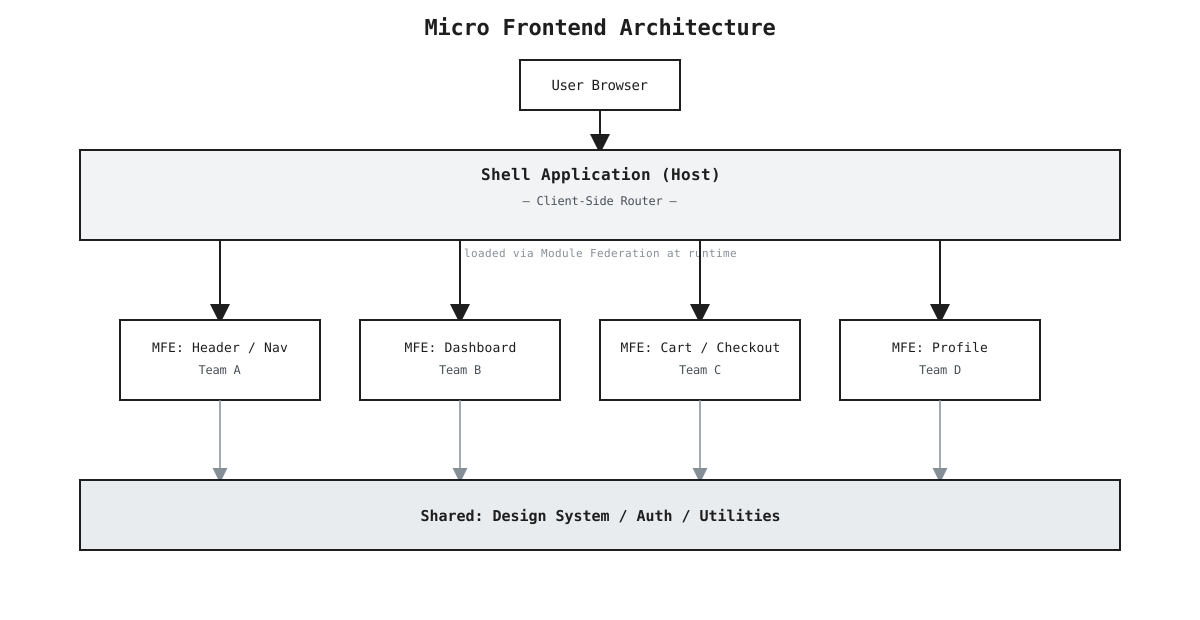
Editable source:
mfe-architecture.drawio— open it at app.diagrams.net (File → Open From → Device).
The Implementation: Module Federation
The dominant runtime approach today is Webpack 5 Module Federation. It lets one webpack build (the shell) dynamically load JavaScript modules from another webpack build (the remote) at runtime.
A remote exposes a component:
 1// cart/webpack.config.js
 2module.exports = {
 3  plugins: [
 4    new ModuleFederationPlugin({
 5      name: "cart",
 6      filename: "remoteEntry.js",
 7      exposes: {
 8        "./CartWidget": "./src/CartWidget",
 9      },
10      shared: { react: { singleton: true }, "react-dom": { singleton: true } },
11    }),
12  ],
13};
The shell consumes it:
 1// shell/webpack.config.js
 2module.exports = {
 3  plugins: [
 4    new ModuleFederationPlugin({
 5      name: "shell",
 6      remotes: {
 7        cart: "cart@https://cdn.example.com/cart/remoteEntry.js",
 8      },
 9    }),
10  ],
11};
And the shell loads the cart component lazily:
1const CartWidget = React.lazy(() => import("cart/CartWidget"));
2
3function App() {
4  return (
5    <Suspense fallback={<Spinner />}>
6      <CartWidget />
7    </Suspense>
8  );
9}
The cart team can deploy a new version of their bundle to the CDN, and the shell picks it up on the next page load — no shell redeploy required.
Communication Between MFEs
MFEs should be as decoupled as possible, but they do need to talk. Three patterns in increasing order of coupling:
Custom Events — fire-and-forget, no shared state:
1// cart MFE dispatches
2window.dispatchEvent(new CustomEvent("cart:updated", { detail: { count: 3 } }));
3
4// header MFE listens
5window.addEventListener("cart:updated", (e) => setCartCount(e.detail.count));
Shared URL / Query Params — navigation-based state, naturally serializable.
Shared State Module — a tiny state package in the shared foundation (zustand store, Redux slice) that multiple MFEs import. Use sparingly; this is the most coupling-heavy option.
The Real Trade-offs
MFE solves real problems, but it introduces real complexity. Be honest with yourself about which side of this line you’re on:
| You need MFE if… | You don’t if… |
|---|---|
| 5+ teams own different parts of the UI | 1-2 teams own the whole frontend |
| Teams need to deploy independently | Deployments are already fast and safe |
| Parts of the app need different tech stacks | You can standardise on one stack |
| Build times are genuinely slowing you down | Your build is under 5 minutes |
The costs are real: more infrastructure, more operational surface area, harder debugging across bundle boundaries, potential for version skew between remotes, and inconsistent UX if teams don’t coordinate on the design system.
Alternatives Worth Considering
Before committing to MFE, check if simpler approaches solve the same problem:
- Monorepo with independent packages — same repo, clear ownership boundaries, shared CI, no runtime complexity
- Route-based code splitting — lazy-loaded chunks per route, still one deployment unit but much faster builds
- Nx / Turborepo affected-only builds — only rebuild and redeploy what changed; solves the build time problem without runtime stitching
When It’s Worth It
MFE is the right call when team autonomy at the deployment boundary is the core requirement — not just the build boundary. If teams truly need to ship independently, on their own cadence, without any coordination, then the runtime composition complexity is worth it.
If you’re doing it because the architecture looks impressive in diagrams, it’s not.